On February 2, 2026, OpenAI launched the Codex desktop app for macOS. This tool allows developers to assign tasks to AI agents, manage multiple projects, and automate repetitive coding jobs. Designed for efficiency, it supports parallel workflows, integrates seamlessly with tools like GitHub and Slack, and offers features like "Skills" for task automation and "Automations" for scheduled processes. Codex enhances productivity by handling tasks such as debugging, refactoring, and even creating entire features. With over 1 million developers already using Codex, this release marks a step forward in AI-assisted coding.
Key Features:
- AI-Assisted Coding: Generates code, explains legacy systems, and identifies logic errors.
- Project Management: Includes Git integration, thread isolation, and terminal support.
- Task Automation: Handles repetitive jobs like issue triage and CI/CD processes.
- Tool Integration: Works with platforms like Figma, Linear, and Vercel.
- Security: Employs sandboxing to limit agent access and ensure safe operations.
Codex is available to ChatGPT Free, Go, and paid plan users, with higher rate limits for premium tiers. It supports both local and cloud environments, making it adaptable for individual developers and business teams alike.
Core Features of the Codex Desktop App
AI-Assisted Code Writing and Debugging
Codex takes coding assistance to a whole new level. Instead of simply completing lines of code, it can handle entire features or tasks autonomously. Developers can assign multiple tasks at once to Codex agents, which operate independently for up to 30 minutes [6]. The app generates code based on natural language instructions, fits seamlessly into existing project structures, and even explains complex legacy codebases – no more hunting through files trying to make sense of outdated logic.
Its debugging tools go far beyond basic syntax checks. Codex can identify logic errors, pinpoint edge cases, and trace issues back to their source, offering precise fixes [6]. It even runs code and tests independently to validate functionality, essentially doubling as a quality assurance tester. OpenAI showcased this capability in February 2026 when Codex built "Voxel Velocity", a 3D voxel kart racing game with advanced features like driving physics, multiple tracks, and an AI difficulty system – all using over 7 million tokens [2].
Another standout feature is "Plan Mode", which allows Codex to review complex changes and discuss strategies before execution. This helps developers feel more confident about the solutions being implemented [6]. Combined with its ability to manage version control and streamline workflows, Codex can significantly enhance project efficiency.
Git Integration and Project Management Tools
Codex doesn’t stop at coding – it also tackles collaboration and project management. Its integrated Git tools make it easy to review diffs, add inline comments, stage changes, revert mistakes, and commit updates without switching between tools [3]. With Git worktree support, developers can isolate changes across threads, enabling parallel task management [3][5]. Each thread even comes with its own terminal for testing, running servers, or executing custom commands [3].
The app also supports the Model Context Protocol (MCP), which lets Codex agents connect to external platforms and tools [3]. Developers can create reusable "Skills" that bundle instructions and scripts, allowing Codex to interact with services like Figma, Linear, or Vercel [3][5]. Its cross-tool syncing ensures that "Auto Context" and active threads are shared between the desktop app and IDE extensions like VS Code, Cursor, and Windsurf [3][7].
Automation for Repetitive Coding Tasks
Codex excels at automating repetitive tasks, saving developers valuable time. It can handle routine jobs like refactoring, writing tests, cleaning up code, and managing technical debt [6][9]. By pairing "Skills" with "Automations", developers can even automate background tasks such as issue triage, alert monitoring, and CI/CD processes [2][3]. These automations run on schedules you define, letting you focus on higher-priority work.
In October 2025, Cisco engineers reported cutting the time spent on complex pull request reviews by half using Codex. This freed them to concentrate on more impactful work while Codex handled manual code checks for both human-written and AI-generated code [4][8]. Tres Wong-Godfrey, Tech Lead at Cisco Meraki, shared his experience:
I needed to update a codebase owned by another team for a feature release. […] With Codex, I offloaded the refactoring and test generation while focusing on other priorities. It produced high-quality, fully tested code that I could quickly hand back – keeping the feature on schedule without adding risk [8].
In 2025, Instacart took automation a step further by integrating the Codex SDK with its "Olive" platform. This allowed engineers to clean up technical debt – like removing dead code or outdated experiments – with just a single click in remote development environments [4]. These automations not only save time but also align with broader goals, enabling developers to focus on meaningful innovation.
How Developers and Businesses Can Use Codex
Faster Web Development and Site Updates
Codex simplifies website development by allowing developers to tackle multiple tasks – like bug fixes, feature builds, and updates – all at the same time. Thanks to its multi-agent parallelism, developers can assign different agents to handle separate tasks, with each running in its own thread. This setup ensures that code conflicts are avoided since each agent operates in an isolated work environment [2][10].
Deployment is also a breeze. Codex supports platforms like Vercel, Cloudflare, Netlify, and Render, and can even transform Figma designs into production-ready UI code with precision [2][6]. For example, during an internal test, a team of just four engineers used Codex to build and launch the Sora Android app in only 18 days [6].
For ongoing site maintenance, Codex offers Automations that run on custom schedules. These automations can handle routine tasks like identifying continuous integration (CI) failures, triaging issues, and drafting release briefs – all without requiring manual input [2][6]. Sam Altman, CEO of OpenAI, highlighted its efficiency by saying:
I did this fairly big project in a few days earlier this week and over the weekend. I did not open an IDE during the process. Not a single time [6].
This level of integration makes Codex a powerful tool for web development and sets the stage for its use in other areas like data management.
Managing and Processing Spreadsheet Data
Codex also excels in handling spreadsheet tasks, offering dedicated spreadsheet skills to read, create, and edit files. Businesses can use it to process large datasets by pulling information from multiple sources, organizing it, and producing polished spreadsheets – all without manual data entry. Automations can be scheduled to perform these tasks regularly, saving time and effort [2].
Its parallel processing capabilities let multiple data operations run simultaneously without any resource conflicts. Additionally, all tasks are executed in secure, isolated sandboxes, ensuring that agents only access authorized files [2]. Since the launch of GPT‑5.2‑Codex in December 2025, usage has skyrocketed, with over 1 million developers leveraging the tool in just the month leading up to February 2026 [2][1].
Improving Product Development Processes
Codex takes product development to the next level by integrating seamlessly with team tools. By connecting Codex to project management platforms like Linear, teams can automate bug triaging, track releases, and manage workloads more efficiently. Its integration with Figma ensures that designers can hand off assets that Codex then converts into code, perfectly matching the original design [2].
A great example of its impact is Instacart, which incorporated the Codex SDK into their internal "Olive" platform. This allowed their engineers to tidy up technical debt, such as removing unused code and outdated experiments, with just a single click [4]. Teams can also create custom Skills and store them in their repository’s configuration, ensuring consistent development standards for deployment and code style across the board [2].
Codex App – A First Look for App Development
sbb-itb-7878072
Connecting Codex with Your Current Tools
Codex is built to fit right into your existing workflow without disrupting the tools you already rely on. It syncs session history and configurations across the Codex CLI, IDE extensions, and the desktop app. This means you can move effortlessly between your terminal, Visual Studio Code, and the desktop app while keeping your project state intact [2].
For developers, Codex offers extensions for Visual Studio Code, Cursor, and Windsurf, providing real-time, in-editor assistance. It supports the Model Context Protocol (MCP), ensuring standardized connections. Teams can also expand Codex’s functionality using Skills to integrate with platforms like Figma, Linear, Vercel, or Cloudflare.
Configuration management is streamlined with project-level config.toml files, which enforce shared defaults, approval workflows, and sandbox settings. If your company uses custom internal tools, the TypeScript-based Codex SDK allows you to embed Codex directly into your workflows. For example, in October 2025, Instacart incorporated the Codex SDK into "Olive", their internal platform. This integration enabled engineers to automate tasks like cleaning up technical debt – removing dead code and outdated experiments – with just one click [4].
Codex also enhances collaboration. It integrates with Slack, allowing teams to assign tasks by tagging @Codex in threads. Once tasks are completed, they’re linked back in the Codex cloud. For repository management, Codex connects directly with GitHub to handle pull request reviews and cloud tasks. It even supports git worktrees, enabling multiple agents to work on the same repository in isolated environments, avoiding local conflicts.
Security is a core focus. Codex uses configurable sandbox levels to limit agent access to specific folders or branches. By default, agents can only edit files in the active folder and require explicit permission for network access or elevated commands. This ensures a controlled and secure development environment.
Implementation Steps for Business Teams
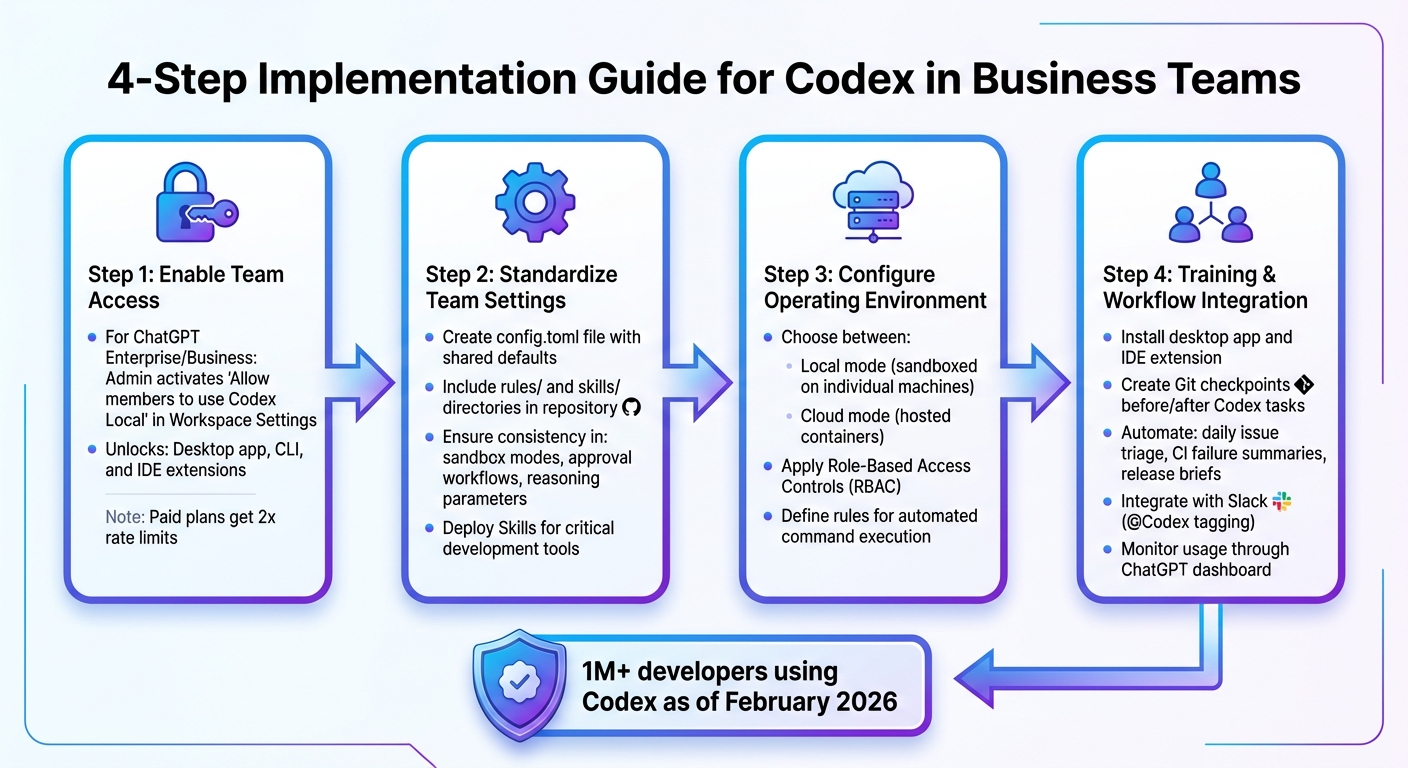
4-Step Implementation Guide for Codex in Business Teams
To make the most of Codex’s features and integrations, start by enabling access for your team. If you’re using ChatGPT Enterprise or Business, an administrator needs to activate the "Allow members to use Codex Local" setting in Workspace Settings. This unlocks access to the desktop app, CLI, and IDE extensions. For ChatGPT Free and Go users, Codex is also available, but paid plans benefit from 2x rate limits [2].
Once access is enabled, standardize team settings by creating a config.toml file with shared defaults. Include rules/ and skills/ directories in your repository to ensure consistency in sandbox modes, approval workflows, and reasoning parameters. You can also deploy specific Skills to integrate Codex with your team’s critical development tools.
When configuring Codex, selecting the right operating environment is key to maintaining secure workflows. Decide between Local mode (sandboxed on individual machines) and Cloud mode (hosted containers). Apply Role-Based Access Controls (RBAC) tailored to your chosen mode. You can also define rules to allow automated execution of specific commands for certain projects, streamlining processes while keeping security intact.
Training and workflow integration should focus on hands-on use. Guide developers to install the desktop app and IDE extension to retain session history and enable Auto Context. Encourage team members to create Git checkpoints before and after completing Codex tasks. Automate repetitive tasks, such as daily issue triage, CI failure summaries, and release brief generation. For collaboration, integrate Codex with Slack, allowing team members to assign tasks by tagging @Codex in threads. Monitor these integrations to measure how they improve team workflows.
You can track adoption and usage through the ChatGPT dashboard’s Usage tab. As of February 2026, Codex is used by over one million developers, with usage doubling after the launch of GPT-5.2-Codex in December 2025 [2]. Within OpenAI, nearly all engineers rely on Codex, showcasing its ability to significantly boost team productivity when implemented effectively [4].
Conclusion
Codex is reshaping how developers approach their work by automating repetitive tasks and integrating effortlessly with existing tools. Instead of coding line-by-line, developers now focus on managing autonomous agents. With over one million users as of February 2026 and usage doubling since the launch of GPT-5.2-Codex in December 2025 [2][6], it’s clear that this tool is making a significant impact. By automating tasks like managing technical debt, refactoring, and generating tests, Codex speeds up development and streamlines workflows.
These time-consuming tasks, which often slow down teams, are now handled efficiently by Codex. As Sam Altman put it:
The hardest mental adjustment to make about working with these sort of AI coding teammates, unlike a human, is the models just don’t run out of dopamine. They keep trying [6].
Codex goes beyond just task automation. Its ability to execute tasks in parallel, run background processes, and leverage extensible Skills allows developers to manage multiple projects at once. This shift from focusing on perfecting one solution to exploring 20 or more in parallel redefines productivity standards [6]. For businesses, this means the potential to streamline workflows and achieve higher output than ever before.
FAQs
How does Codex help developers work more efficiently?
Codex empowers developers to work smarter by taking care of repetitive coding tasks, enabling effortless multitasking, and working seamlessly with popular IDEs and local development setups. These capabilities simplify workflows, cut down on time spent on manual tasks, and improve overall efficiency.
What’s more, Codex boosts productivity by freeing developers to concentrate on solving challenging problems, while it handles the routine work. This makes juggling multiple projects easier and fosters smoother collaboration within teams.
What tools and platforms does the Codex app integrate with?
The Codex app brings together several tools to streamline coding workflows. With built-in Git support, developers can manage version control directly in the app, eliminating the need to switch between platforms. It also syncs effortlessly with popular IDE extensions, letting you stick to the development environments you already know and use.
The app further supports local environments and automations, making it easier to juggle multiple projects at once. Plus, it serves as a central hub for managing multiple AI agents, fostering collaboration across projects. It integrates smoothly with cloud environments and other tools, helping developers stay productive and organized. These features position Codex as a valuable tool in any developer’s arsenal.
How does Codex prioritize security while automating coding tasks?
Codex places a strong emphasis on security by executing each task within an isolated cloud sandbox. This setup ensures that tasks remain self-contained, effectively blocking any unauthorized access to other systems or sensitive information.
For developers who prefer working locally, Codex also supports controlled, isolated environments. With integrations like Git, the platform facilitates secure code management and review processes, adhering to widely accepted software development practices. Together, these features create a protected and streamlined workflow for handling automated coding tasks.