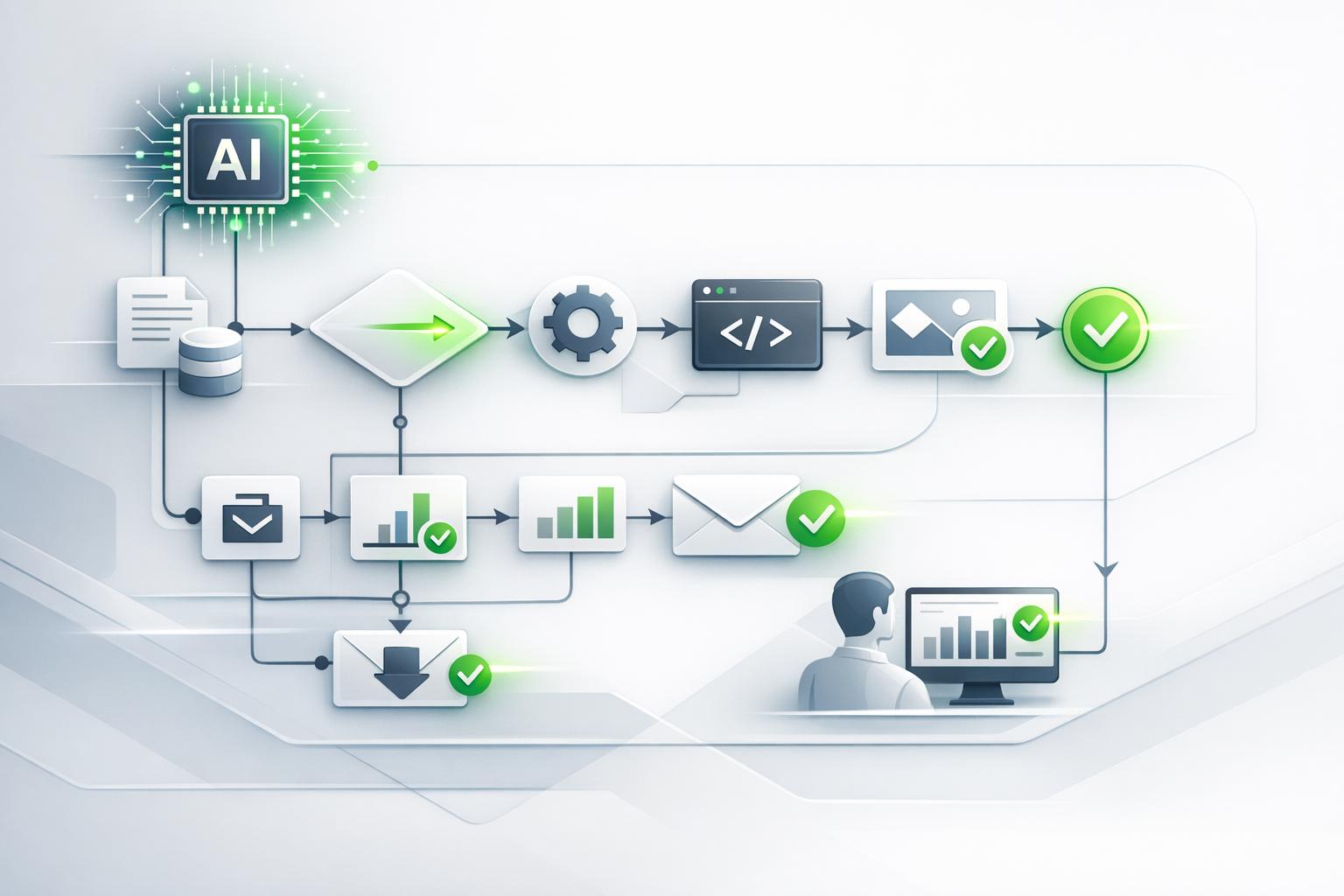
Generative AI is changing the way businesses operate by automating complex tasks and creating new opportunities for efficiency. Unlike older automation systems, it handles unstructured data like emails or documents and generates original content or processes. Businesses using generative AI have reported:
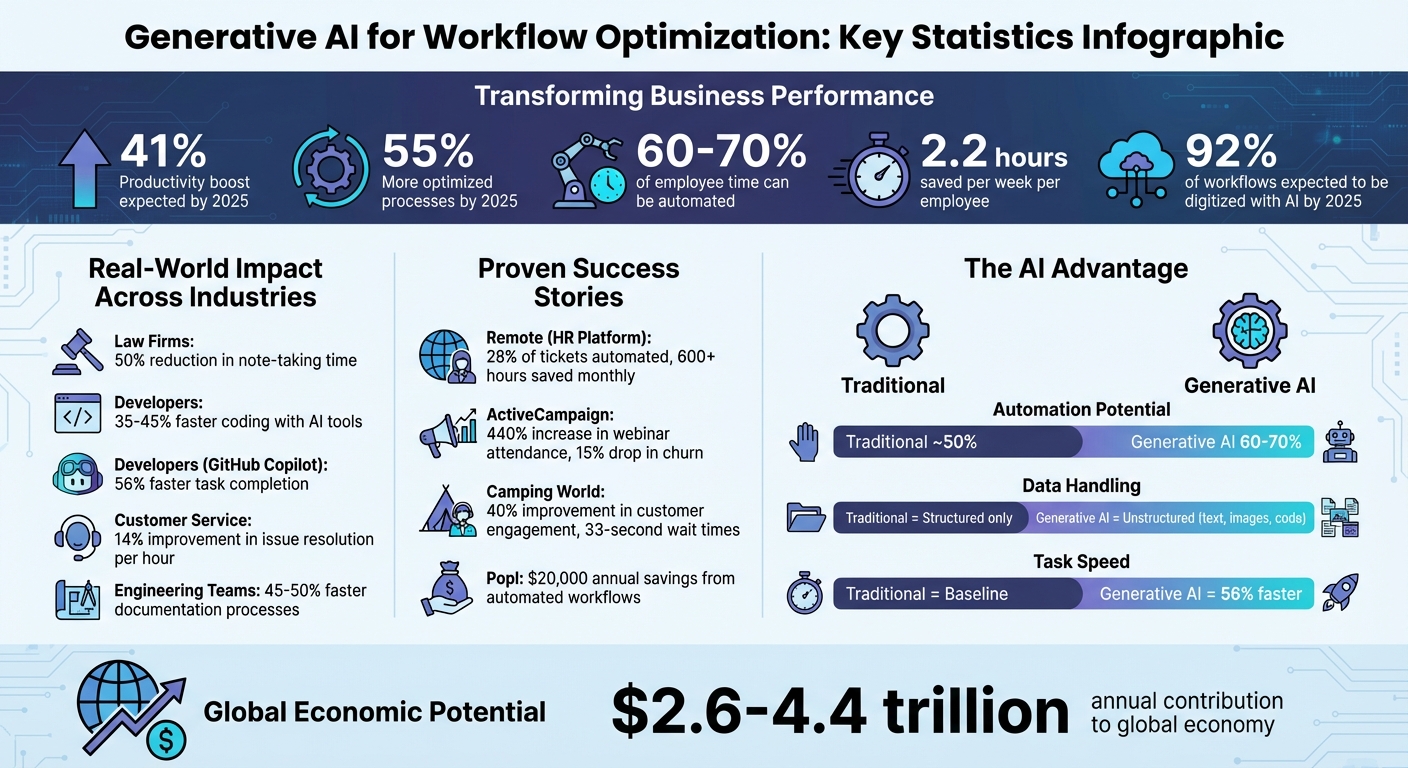
- 41% productivity boost and 55% more optimized processes by 2025.
- Automation of tasks consuming 60-70% of employee time.
- Savings of 2.2 hours per week for employees, with faster task completion.
Key industries – healthcare, legal, retail, and software – are already seeing results. For example, AI tools reduce note-taking time by 50% in law firms and speed up coding by 35-45% for developers. By 2025, 92% of workflows are expected to be digitized with AI.
To get started, focus on repetitive tasks like email drafting, ticket routing, or data entry. Use AI tools like ChatGPT or GitHub Copilot to save time and improve accuracy. Build a cross-functional team to deploy and monitor AI systems, ensuring ethical and secure usage. The future of work is here – AI as your digital teammate. To implement these changes effectively, consider working with an AI consultant.
Generative AI Workflow Optimization: Key Statistics and Impact Metrics
Automating ANY Process: 5 Levels of AI Automation (Full Guide)
How to Optimize Workflows with Generative AI
Generative AI goes beyond traditional rule-based systems by interpreting context and handling ambiguous inputs [8]. The trick lies in identifying where it provides the most impact. Focus on repetitive tasks that benefit from a touch of human-like reasoning, such as categorizing support tickets by tone, summarizing customer feedback, or drafting preliminary content [8][11]. By 2025, 92% of executives expect their organizations’ workflows to be digitized using AI-powered automation [10], and 60% predict AI assistants will handle most traditional processes [3]. McKinsey projects that generative AI could automate up to 10% of all tasks in the U.S. economy [10]. Let’s dive into how generative AI automates mundane tasks, prioritizes work, and refines data.
Automating Repetitive Tasks
Generative AI thrives on tasks that require little expertise but consume a lot of time. Think email drafting, data entry, report generation, and document summarization. These tasks are ideal because AI can adapt to varied inputs while maintaining consistency.
Take the global HR platform Remote, for example. In December 2025, they managed 1,100 monthly IT support tickets for 1,800 employees with just a three-person team. By integrating ChatGPT and Zapier, they automated ticket classification and response generation using Okta context, historical ticket data, and automated drafting. This setup handled 28% of tickets automatically, saving the team over 600 hours each month [8][11].
Another example is ActiveCampaign, which faced a 25% churn rate among new users due to a lack of personalized onboarding. They implemented an AI-driven system that tagged users by language, enrolled them in appropriate webinars via Demio, and sent personalized follow-ups based on attendance. The results? A 440% increase in webinar attendance, a 15% drop in 90-day churn, and double the product adoption within the first 30 days [8][11].
"It’s not just about doing more. It’s about doing it better, faster, and with fewer resources." – Jason Alvarez-Cohen, CEO, Popl [11]
Start with one high-impact workflow before expanding across your organization. For tasks that require a human touch – like legal reviews or customer-facing communications – integrating a human-in-the-loop approval step ensures accuracy and builds trust [9][11].
Prioritizing Tasks Based on Context
Traditional automation often struggles to interpret urgency or sentiment. Generative AI, however, can process unstructured data – such as emails, chat threads, and support tickets – to identify intent, tone, and priority. It then routes tasks to the right team member based on expertise, severity, and past performance [9][12].
In July 2025, Popl, a digital business card company, implemented an AI-driven sales pipeline using Zapier and OpenAI. Their system categorized hundreds of daily inbound emails from HubSpot and Salesforce, filtering out spam and directing legitimate leads based on criteria like company size and region. This project, spearheaded by CEO Jason Alvarez-Cohen, utilized over 100 automated workflows and saved the company $20,000 annually by replacing costly manual processes [8][11].
The process is straightforward: Trigger → AI Analysis → Conditional Path. For instance, the AI can summarize a support ticket, then route "Urgent" items to Slack while filing "Low Priority" items into a backlog [9]. Using centralized tools like Zapier Tables allows the AI to reference historical data and metadata when making decisions. For more complex planning, reasoning models like GPT-o1 excel at understanding overarching goals and breaking down details autonomously [13]. Beyond prioritization, generative AI also transforms raw data into actionable insights.
Automated Data Enrichment
Generative AI can take unstructured data – emails, PDFs, meeting transcripts, or even images – and turn it into structured, machine-readable formats. It ensures accuracy, flags errors, and standardizes messy inputs before integrating them into internal systems [10][14].
For example, AI can extract and structure lead data from email domains, optimizing it for CRM systems [8][11]. Advanced models like GPT-4o can analyze images of graphs, charts, or tables, extracting data directly into spreadsheets or databases [14].
| AI Model | Best Use Case for Enrichment | Key Capability |
|---|---|---|
| GPT‑4o / GPT‑5 | Multimodal Extraction | Analyzes text, images, and audio for complex data entry [14] |
| Claude | Long Document Analysis | Ideal for legal review and extracting data from lengthy reports [9] |
| Gemini | Workspace Integration | Enriches data across Google Docs, Sheets, and Gmail [9] |
| Perplexity | Real‑Time Research | Appends citation‑backed, real‑time data to internal records [9] |
For sensitive tasks like financial records or legal summaries, adding a manual approval step reduces the risk of AI errors or "hallucinations" [9][11]. Monitoring token usage and setting cost-cap alerts can also help keep automated workflows budget-friendly [9].
Centralizing data sources to create clean, structured inputs is critical – after all, "garbage in, garbage out" [8][9]. Regular audits of AI workflows are necessary to refine prompts, add safeguards, and maintain accuracy over time [8][9].
Benefits of Generative AI in Workflow Optimization
Generative AI is reshaping how businesses operate by automating up to 70% of employee tasks – far surpassing the 50% automation potential of traditional systems [5]. This leap in efficiency could contribute an impressive $2.6 trillion to $4.4 trillion annually to the global economy across 63 identified use cases [5][6]. These figures highlight the transformative potential of generative AI in streamlining workflows across various industries.
Productivity and Efficiency Gains
Generative AI is driving productivity to new heights. For instance, developers using GitHub Copilot completed tasks 56% faster than those without AI assistance. In customer service, issue resolution improved by 14% per hour, with a 9% reduction in time spent on each issue [5]. Engineering teams also saw significant gains, with coding speeds increasing by 35% to 45% and documentation processes accelerating by 45% to 50% [6].
Real-world examples further illustrate these benefits. In 2024, Camping World teamed up with IBM to implement AI-driven customer engagement workflows. The result? A 40% improvement in customer engagement and wait times reduced to just 33 seconds [10]. Similarly, by mid-2025, Invideo AI leveraged OpenAI models to revolutionize video production, creating videos ten times faster than traditional methods [2].
"Instead of taking everyone’s jobs… it might enhance the quality of the work being done by making everyone more productive." – Rob Thomas, SVP Software and Chief Commercial Officer, IBM [10]
Generative AI also addresses a major productivity drain: knowledge workers spend about 20% of their time searching for information. AI tools eliminate this bottleneck by using natural language queries to quickly sift through corporate libraries and deliver precise answers. By 2025, 87% of executives expect AI-powered assistants to reliably manage information retrieval, allowing employees to focus on strategic priorities [3]. Additionally, executives predict a 41% productivity boost as AI takes over routine tasks and assists with more complex work [3].
Better Accuracy and Fewer Errors
When it comes to handling large, complex datasets, generative AI outperforms manual processes. Unlike humans, who can be affected by fatigue or distractions, AI tools consistently identify errors in customer-facing content and detect patterns that might otherwise go unnoticed [10][11]. They are particularly effective at converting unstructured data into actionable insights [5].
In software development, generative AI reduces errors by automating repetitive tasks like code documentation and refactoring. For example, it can refactor code 20% to 30% faster than traditional methods [6]. To ensure accuracy in sensitive workflows, many organizations use a human-in-the-loop approach, combining the speed of AI with human oversight to minimize risks [6][11].
Traditional vs. Generative AI Workflows
The contrast between traditional workflows and those powered by generative AI highlights the technology’s transformative impact.
| Metric | Traditional Workflows | Generative AI Workflows |
|---|---|---|
| Automation Potential | ~50% of work activities [5] | 60–70% of work activities [5] |
| Data Type | Structured data (e.g., forms, spreadsheets) [10] | Unstructured data (e.g., text, images, code) [5] |
| Software Task Speed | Baseline (1.0x) | 56% faster completion [5] |
| Customer Wait Times | Typically measured in minutes | 33 seconds (Camping World) [10] |
| Maintenance Costs | Reactive/scheduled maintenance | 50% reduction in downtime (Toyota) [10] |
| Error Handling | Manual oversight or rigid rules [10] | Automated error detection [10] |
Switching to generative AI workflows transforms back-office operations from transactional centers into hubs for strategic decision-making [5][3]. Rather than replacing employees, AI acts as a digital teammate, freeing up human workers to focus on tasks that demand empathy, creativity, and critical thinking [10][3]. Interestingly, the technology often has the biggest impact on less-experienced workers, enabling them to perform at levels comparable to their highly skilled counterparts [5][6].
sbb-itb-7878072
How to Implement Generative AI in Your Workflows
You don’t need to overhaul your entire operation to incorporate generative AI. The key lies in pinpointing the right processes, assembling a capable team, and deploying systems that can evolve and improve. Start by identifying the workflows that are ready for automation.
Identifying Processes for Automation
Focus on repetitive, rule-based, and data-driven tasks. Processes with high volumes and predictable patterns – such as data entry, ticket routing, or document processing – are excellent candidates for automation [1][12].
Pay close attention to how data moves between teams or systems. These handoff points often reveal manual bottlenecks [16]. For example, transitions between customer service and billing, or sales and operations, often involve tedious tasks like copying, pasting, or reformatting data. These areas are ripe for automation and can significantly improve efficiency when optimized.
To decide which processes to automate first, use a scoring matrix. Evaluate potential use cases based on their impact on revenue, cost savings, technical complexity, resource needs, and time to implement [1]. This method helps you avoid flashy AI projects that don’t align with your business goals. Instead, prioritize the processes that cause the most frustration or slow down operations [3]. Align your AI initiatives with a few key strategic objectives, and if a task doesn’t clearly support those goals, save it for later [7].
"It’s not about automating the tasks that already exist – it’s about weeding out bad processes and introducing workflows that are entirely new." – IBM Institute for Business Value [3]
Looking ahead, executives anticipate a 55% increase in AI-augmented business processes by 2025, with 60% expecting AI assistants to handle most traditional workflows by then [3]. This shift is already driving a projected 41% boost in productivity for operations teams [3].
Selecting Tools and Building Teams
Once you’ve identified automation opportunities, it’s time to choose the right tools and assemble a team to bring your strategy to life. Businesses typically follow one of three approaches:
- Takers: Use off-the-shelf solutions like ChatGPT or GitHub Copilot with minimal customization.
- Shapers: Adapt AI models to integrate with proprietary data and systems.
- Makers: Build custom foundation models from scratch, a costly option suited only for organizations seeking a distinct competitive edge [6].
For most companies, the Taker or Shaper approach offers the best balance of cost and return. Save the Maker strategy for areas where differentiation is crucial, and use readily available tools for everything else.
Form a cross-functional team to ensure smooth implementation. This team should include:
- An executive sponsor to set the vision and secure resources.
- A project lead to manage the initiative.
- Business managers to identify pain points.
- Data engineers to prepare data pipelines.
- AI developers to handle technical integration.
- Champions to promote adoption and share best practices [1][7].
| Role | Responsibility |
|---|---|
| Executive Sponsor | Sets vision, secures resources, and leads by example [7] |
| Data Scientist | Develops and maintains AI models [1] |
| Data Engineer | Prepares and validates data pipelines [1] |
| AI Developer | Integrates AI models into existing systems [1] |
| Champions | Encourage team adoption and share field-tested practices [7] |
With 64% of CEOs emphasizing that success with AI depends more on adoption by people than on the technology itself [3], your team structure should reflect this reality. Consider adding roles like process orchestrators to manage AI workflows, as suggested by AI expert Lasse Rouhiainen, digital librarians to oversee prompt libraries and ethical guidelines, and experience designers to fine-tune automated processes [3].
Deploying and Optimizing Workflows
With your processes and team in place, the next step is deploying and fine-tuning your AI workflows. Start with a proof of concept that outlines data preprocessing, model criteria, and performance metrics. Use 30-day sprints with live data to test and refine your approach, documenting playbooks and integration scripts along the way [1][16].
Integrate AI models into your systems using frameworks like LangChain or LlamaIndex [6]. Establish a centralized, cross-functional platform team to manage approved models, ensuring consistent governance and avoiding issues like shadow deployments or vendor lock-in [16].
From day one, create feedback loops between end users and technical teams [1]. Enhance MLOps pipelines to monitor performance and catch errors [6]. For critical decisions, maintain human oversight to ensure quality control – this human-in-the-loop strategy minimizes costly mistakes while the system learns [17].
To improve accuracy and build trust, use Retrieval Augmented Generation (RAG) to ground model responses in verified internal data sources [17]. Adjust the "temperature" of models based on the task – higher for creative brainstorming, lower for tasks requiring precision [6]. Require all AI tools to expose standard APIs so you can switch models without overhauling your systems [16].
Scale your efforts strategically. Begin with low-risk, high-impact use cases, then expand as the system matures [1][6]. Companies using structured adoption frameworks are three times more likely to achieve meaningful productivity gains compared to those taking an ad hoc approach [16].
Finally, provide an "owner’s manual" for employees to help them use AI tools effectively and responsibly in their roles. Workers using AI-enhanced tools like Superhuman report saving 37% more time compared to those who don’t [16].
Best Practices for Long-Term Success
To maintain the productivity and efficiency gains achieved through AI-driven workflow optimization, it’s crucial to focus on more than just deployment. The real work begins with continuous monitoring, team training, and a commitment to ethical practices.
Real-Time Monitoring and Feedback Loops
Set up dashboards to track both technical performance and business outcomes. Start by documenting baseline metrics, like average ticket resolution time, and compare them over 30, 60, and 90 days to assess progress [7].
Incorporate automated quality checks into your CI/CD pipelines. These checks can use an "LLM-as-a-judge" approach to evaluate outputs for accuracy and relevance. As AWS advises:
"A build should automatically fail if quality scores, such as faithfulness or relevance, drop below a predefined threshold" [18].
When deploying new models, use methods like shadow testing, A/B testing, or canary deployments to ensure safety. Real-time alerts and feedback channels are essential for quickly addressing performance issues. Pair these tools with employee surveys to gain a comprehensive understanding of AI’s impact [7]. Research shows that companies with structured monitoring frameworks are three times more likely to achieve noticeable productivity improvements from AI [16].
These practices create a strong foundation for integrating AI into your team while ensuring ethical oversight.
Training Teams for AI Integration
Once monitoring systems are in place, the next step is empowering your team. Equip them with skills in areas like prompt design, data stewardship, and task decomposition to ensure they can adapt over time [16]. Currently, only 15% of business and IT leaders report having expert knowledge in generative AI [4], highlighting the need for robust training programs.
Develop a multi-tiered task force with clearly defined roles: an Executive Sponsor to set the vision, a Project Lead to manage the rollout, HR and Learning & Development teams to build skills, and Champions to drive adoption across functions [7]. Champions can help reduce resistance and accelerate the integration process.
A phased 90-day training plan can be particularly effective. For example:
- Weeks 1–2: Focus on basic productivity tasks.
- Weeks 3–4: Advance to research and analysis.
- Weeks 7–8: Train teams to build custom AI assistants [15].
Integrate these training efforts into your existing Learning Management System and hold brainstorming sessions to identify repetitive tasks that could be automated. With 87% of professionals believing AI is essential for staying competitive [16], investing in AI training is no longer optional.
Ethical Considerations and Responsible Use
Generative AI has the potential to amplify existing biases, which could lead to discriminatory outcomes [19]. It’s vital for organizations to take responsibility for the accuracy, legality, and ethical implications of AI-generated content. Adopting FASTER principles – Fair, Accountable, Secure, Transparent, Educated, Relevant – can help guide responsible AI use [19].
To protect sensitive information, avoid inputting personal or confidential data into public AI tools. Instead, enforce secure access protocols like SSO and SCIM, encrypt data both at rest and in transit, and set custom data retention policies [7][20]. Always verify critical outputs with human oversight to ensure quality and accountability, as AI models can sometimes produce "hallucinations" – false information presented as fact. The Government of Canada emphasizes:
"Institutions should evaluate generative AI tools for their potential to help employees, not replace them" [19].
Transparency is equally important. Clearly notify users when they are interacting with AI and label AI-generated content. Ensure decisions supported by AI are explainable and well-documented. For high-risk applications, use adversarial testing, or "red teaming", to identify potential vulnerabilities before deployment. Additionally, offer "opt-out" options to prevent organizational data and prompts from being used to train future models [19].
Generative AI holds the potential to contribute between $2.6 trillion and $4.4 trillion annually to the global economy [6]. However, this value must be created responsibly.
| Ethical Principle | Organizational Action |
|---|---|
| Fairness | Use GBA Plus (Gender-Based Analysis Plus) to assess impacts on different population groups [19]. |
| Transparency | Notify users when interacting with AI and label all AI-generated content [19]. |
| Security | Enforce SSO and SCIM for workspace access, ensure data encryption at rest and in transit, and set custom data retention policies [7][20]. |
| Accountability | Establish monitoring and oversight mechanisms to track AI impacts and compliance [19]. |
Conclusion
Generative AI is reshaping how organizations streamline workflows. By processing unstructured data, grasping context, and learning from outcomes, this technology evolves from being just a tool to becoming a core partner in boosting workflow efficiency [3].
The impact is clear: CEOs anticipate a 41% rise in productivity, software engineers report working 35% to 45% faster, and customer support teams experience up to 40% productivity gains [3][6].
However, success depends on more than just adopting the technology – it requires aligning AI with existing workflows, company culture, and business goals. Organizations that involve AI experts early in the process and form cross-functional teams are better positioned to implement AI effectively [1][7].
Human adoption plays a critical role. With 64% of CEOs highlighting that success relies on people embracing the technology, investing in training and upskilling becomes non-negotiable [3]. A smart starting point is automating repetitive, high-volume tasks, then gradually moving to more complex processes where AI can autonomously manage multi-step projects with minimal oversight [12][2].
For those looking to deepen their understanding, Lasse Rouhiainen’s book "ChatGPT – 101 Things You Must Know Today About ChatGPT and Generative AI" offers practical strategies and prompts for applying AI in business. Additionally, the 90-day AI Consultant Accelerator program provides hands-on mentoring and project-based learning to help professionals transition into AI consulting roles.
FAQs
How can generative AI help boost productivity in my industry?
Generative AI has the potential to transform productivity across various industries by automating tasks that typically eat up valuable time. Think about activities like drafting reports, summarizing meetings, generating emails, or even managing workflows within your existing tools. By taking over these repetitive chores, AI frees up employees to concentrate on more creative and strategic work that truly impacts business outcomes.
To make the most of this technology in your field, start by pinpointing the most time-consuming parts of your processes – whether it’s handling document processing, managing customer service requests, or performing data entry. Then, integrate AI tools that align with your company’s specific needs and policies. When set up and monitored correctly, generative AI can cut down on manual labor, provide quicker insights, and serve as a dependable digital assistant, empowering your team to accomplish more in less time.
How can I start integrating generative AI into my workflows?
To get started with integrating generative AI into your workflows, begin by outlining your objectives. Think about where AI could make a difference – whether that’s automating tedious tasks, improving decision-making, or speeding up content creation. Set clear, measurable goals so you can evaluate its impact effectively.
Take a close look at your current processes to identify tasks that rely heavily on data or take up a lot of time. These are often the best candidates for AI implementation. At the same time, ensure you have solid policies in place for data privacy, security, and AI oversight to align with your organization’s standards.
Start small – test the AI in a limited capacity, gather feedback from the team, and tweak its application based on real-world results. Once you’re confident in its performance, you can gradually expand its role within your operations.
How can businesses use generative AI responsibly and ethically?
To use generative AI responsibly, businesses need to start with a solid governance framework that reflects their core values and objectives. This means defining clear ethical guidelines, establishing policies for data handling, and performing detailed risk assessments before rolling out AI applications.
Some practical measures include enforcing strict data governance – like limiting the use of proprietary data and ensuring strong encryption protocols. Regular audits of AI outputs can help check for issues related to fairness and privacy. Leadership should play an active role in setting success benchmarks, while cross-functional teams can assess and address potential risks. It’s also crucial to provide ongoing training for employees so they fully grasp both the strengths and limitations of generative AI.
For more tailored support, organizations can turn to specialized workshops and consulting services, such as those provided by the Artificial Intelligence Keynote Speaker program. These resources can guide companies in adopting best practices and promoting a culture of ethical AI implementation.