AI is reshaping workplaces in ways we couldn’t have imagined a few years ago. Here’s what you need to know:
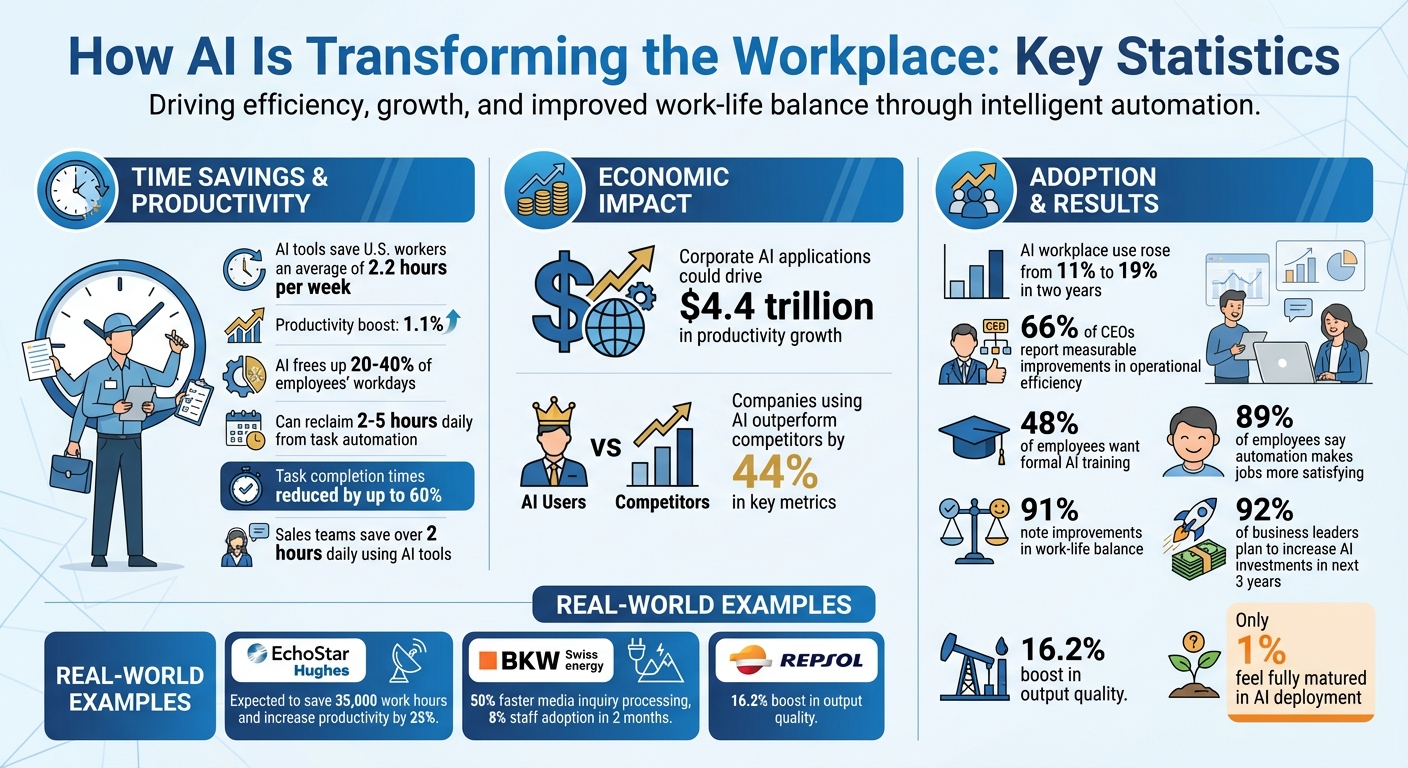
- Efficiency Gains: AI tools like ChatGPT save U.S. workers an average of 2.2 hours per week, boosting productivity by 1.1%.
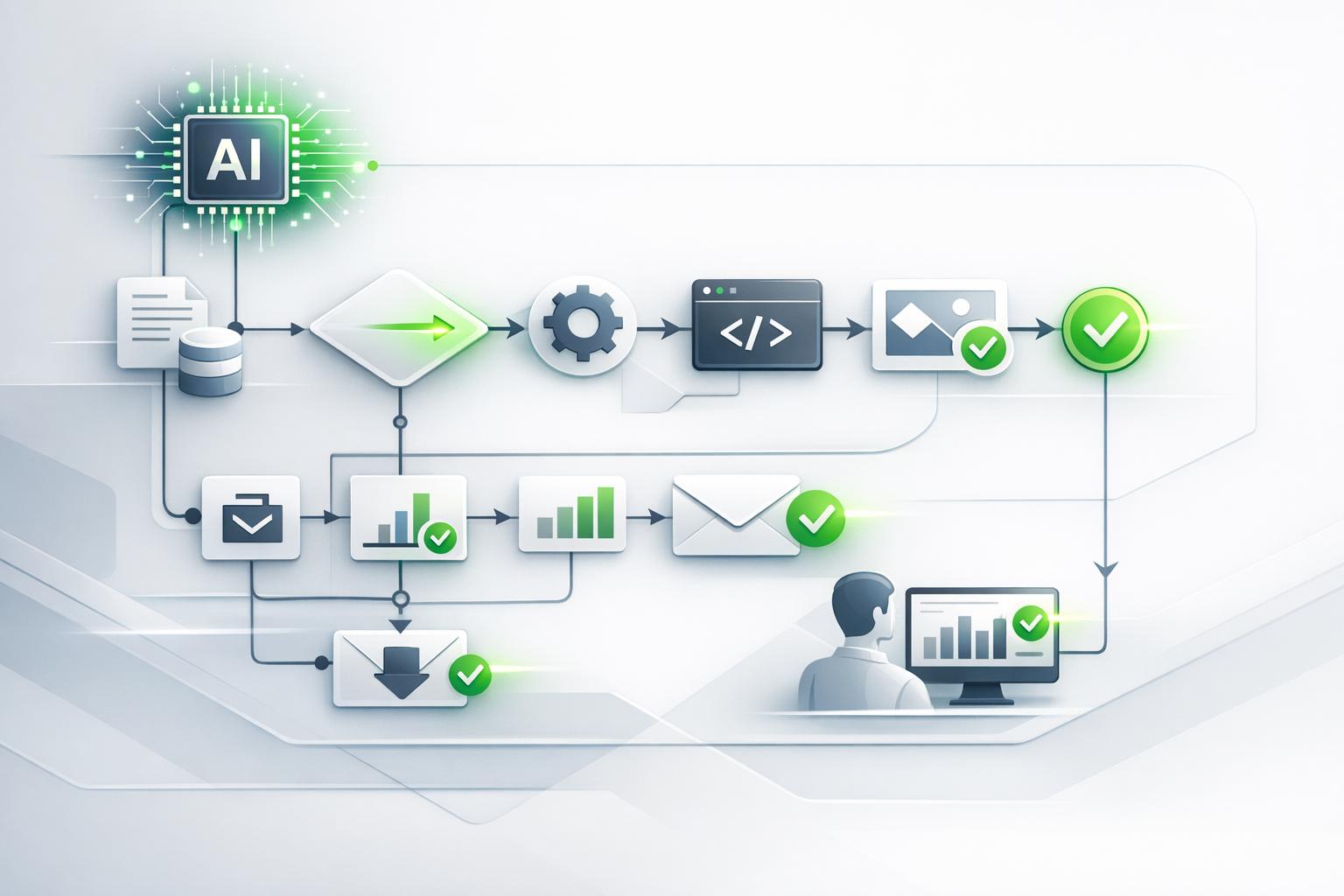
- Automation: Repetitive tasks like data entry, report generation, and email drafting are now handled by AI, freeing up 20–40% of employees’ workdays.
- Smarter Decisions: AI processes complex data to deliver faster, more accurate insights, helping businesses make better decisions.
- Better Collaboration: AI centralizes communication, reduces inefficiencies, and keeps teams focused.
- Economic Impact: Corporate AI applications could drive $4.4 trillion in productivity growth.
AI isn’t just a tool; it’s becoming a core part of how we work. From customer service to long-term planning, businesses are using AI to work smarter while addressing risks like data privacy and accuracy. The key is starting small, setting clear goals, and training employees to use these tools effectively.
AI Workplace Impact Statistics: Productivity Gains and Time Savings
A Practical Guide to Using AI for Work – Part 1 | Make AI Work for You | Google
How AI Is Changing Workplace Operations
AI is reshaping how workplaces function by transforming task execution, decision-making, and team collaboration. These changes are driving noticeable gains in productivity and efficiency. Let’s explore how AI is automating tasks, guiding decisions, and improving teamwork.
Automating Repetitive Tasks
AI takes over routine tasks like data entry, generating reports, and drafting emails, giving employees more time to focus on strategic responsibilities. Studies show this can reclaim 2–5 hours daily and cut task completion times by as much as 60% [5]. In fact, AI can free up 20–40% of an employee’s workday by handling repetitive duties [4].
For instance, a 2024 HubSpot survey highlighted how sales teams using AI tools saved over two hours daily. Tasks like email follow-ups, CRM updates, and data analysis were automated, allowing employees to redirect their energy toward higher-value activities [1]. These systems also learn and adapt as they work, executing tasks with increasing context and precision [5][7]. By automating the mundane, AI enables workers to focus on more impactful contributions.
Driving Data-Informed Decisions
AI excels at turning raw data into actionable insights. It processes massive datasets, identifies patterns, and highlights trends, often performing tasks like data cleaning and normalization that would take humans much longer [6]. The result? Faster, more accurate insights that empower better decision-making.
When paired with domain-specific expertise, AI becomes even more powerful, delivering sharper insights. Tools like agentic AI go a step further by autonomously planning and executing complex tasks – whether it’s detecting fraud, managing payments, or running marketing campaigns. By providing a comprehensive analysis of data, AI helps businesses make decisions based on a broader and deeper understanding, shifting the way companies approach strategy.
Improving Team Collaboration
AI tools are revolutionizing how teams communicate and coordinate. By centralizing communication, automating routine updates, and summarizing key points, AI reduces duplication and speeds up response times [8]. These tools keep team priorities front and center, minimizing distractions and unnecessary context switching.
With AI, scattered information becomes a thing of the past. Teams can work more cohesively, with streamlined processes that allow them to focus on their goals without getting bogged down in miscommunication or inefficiencies. Whether it’s across projects or departments, AI ensures collaboration is smoother and more efficient.
Where to Use AI in Your Workplace
Figuring out where AI fits into your daily operations can help you tackle the right challenges and see faster results. The trick is pinpointing tasks that eat up time but don’t demand complex human decision-making. Here are some areas where AI can make a noticeable difference.
Increasing Internal Productivity
AI tools like ChatGPT are great for handling the kind of administrative tasks that tend to bog you down. Whether it’s drafting emails, summarizing reports, or laying out project plans, these tools can quickly produce first drafts tailored to your style, saving you hours of work. In fact, generative AI can save employees about 2.2 hours in a standard 40-hour workweek [3].
Take EchoStar’s Hughes division, for example. In 2025, they developed 12 production apps using Microsoft Azure AI Foundry to automate tasks like sales call auditing and customer retention analysis. This initiative is expected to save 35,000 work hours and increase productivity by at least 25% [11]. On top of that, AI can also improve customer interactions by handling routine questions, freeing up time for more complex tasks.
Optimizing Customer Service
AI-powered chatbots are perfect for managing repetitive customer service tasks like checking order statuses, resetting passwords, or answering FAQs. These bots operate around the clock, allowing human agents to focus on more complicated issues that require their expertise [9][10]. Using natural language processing, the technology can understand customer intent and emotions, providing accurate responses without any delay.
For instance, in 2025, Swiss energy company BKW launched Edison, a platform built with Microsoft Azure, Azure AI Foundry, and Azure OpenAI services. Within just two months, 8% of their staff were actively using it. The platform sped up media inquiry processing by 50% and documented over 40 use cases [11]. Faster responses lead to happier customers and lower support costs. But AI’s impact doesn’t stop at customer service – it also plays a big role in shaping business strategies.
Using Data for Better Strategy
AI isn’t just about helping with day-to-day decisions; it’s also a game-changer for long-term planning. By turning raw data into actionable insights through dashboards, scenario planning, and trend analysis, AI helps businesses stay ahead of market changes and plan proactively rather than reactively [1].
For example, 66% of CEOs report seeing measurable improvements in operational efficiency thanks to generative AI [11]. At Repsol, AI-driven workflows boosted output quality by 16.2%, enhancing employees’ confidence, creativity, and analytical skills [12]. By automating tasks like data cleaning and pattern recognition – jobs that would take humans much longer – AI allows teams to focus on interpreting insights and making strategic decisions. When fine-tuned with industry-specific knowledge, AI models can provide even sharper and more precise recommendations [2]. These insights don’t just improve operations; they also empower businesses to respond proactively to market changes.
sbb-itb-7878072
How to Add AI Tools Like ChatGPT to Your Business
AI is reshaping how businesses operate, offering new ways to boost productivity and streamline decision-making. If you’re considering tools like ChatGPT for your business, starting small and focusing on clear, employee-centered strategies can make all the difference. With AI use in workplaces rising from 11% to 19% in just two years [13], there’s a lot of untapped potential waiting to be explored.
Set Clear Goals and Usage Rules
Before introducing AI tools, it’s essential to align them with specific business goals. Using frameworks like SMART (Specific, Measurable, Achievable, Relevant, Time-bound) can help clarify your objectives. For instance, are you aiming to cut response times by 30%? Or maybe reduce administrative workloads by 10 hours a week? Defining clear targets keeps everyone on track.
At the same time, establish clear guidelines for how AI should be used. This includes defining approved use cases and implementing policies to protect sensitive data. For example, ensure employees understand the risks of sharing regulated or confidential information with AI tools. Regular vendor security reviews can also help mitigate risks [19]. When leadership communicates a clear stance on AI use, employees are more likely to feel comfortable experimenting within those boundaries.
Start with Low-Risk Projects
When rolling out AI, start with tasks where the stakes are low. For example, use AI for activities like research, drafting internal documents, or screening résumés [13][19]. These are areas where errors are less costly, making them ideal for initial experiments.
A small-scale pilot project can also be a great way to test the waters. For instance, you could deploy an AI chatbot to handle basic customer questions on your website [15][17]. This allows you to explore AI’s potential without a significant investment. Encourage your teams to try out entry-level AI tools – once they see the benefits in action, they’ll be more open to using AI for larger, more complex projects.
Train Your Team and Create Standard Prompts
Training is key to successful AI adoption. Nearly 48% of employees believe formal AI training would encourage them to use these tools more often [16]. Start by explaining how AI can make their jobs easier and create opportunities for hands-on learning [13].
Provide practical training sessions and share standardized prompt templates to ensure consistent and effective use [13][14]. Teach employees about AI’s capabilities, limitations, and how it fits into your organization’s policies. Tailor support to different experience levels – offer advanced sessions for early adopters and interactive workshops for those less familiar with AI [15][17]. According to Salesforce, 89% of employees said automation made their jobs more satisfying, and 91% noted improvements in work-life balance [18]. Highlight these benefits during training to boost enthusiasm.
Managing Risks and Using AI Responsibly
As AI becomes a more integral part of workplace operations, managing risks is just as critical as tapping into its advantages. To avoid exposing your organization to new vulnerabilities, it’s essential to establish clear safeguards around data privacy, accuracy, and fairness. A good starting point? Implement strong data governance practices to protect these systems.
Protecting Data Privacy and Security
Data governance serves as the backbone of any secure AI implementation. Before rolling out AI tools, map out how data moves through your systems, define who has access, and implement measures to protect sensitive information. These steps are crucial for maintaining security and trust [20].
Another key factor is ensuring that AI tools provide explainable outputs rather than opaque, "black box" decisions. When employees can understand how AI arrives at its conclusions, they’re better positioned to identify potential problems and uphold organizational trust [16][20].
Maintaining Accuracy with Human Review
Once your data is secure, the focus shifts to verifying AI outputs. AI is designed to complement human judgment, not replace it. For critical outputs, human oversight is non-negotiable. Require reviews to validate the accuracy of AI-generated results.
Ongoing monitoring is equally important. AI models evolve over time, and changes in data inputs can lead to unexpected errors. Regular testing ensures that potential issues are caught early, keeping AI-generated content aligned with your company’s standards and values.
Reducing Bias and Ensuring Fair Outcomes
Accuracy isn’t enough – AI decisions must also be fair and unbiased. Without proper checks, AI systems can unintentionally reinforce biases, especially in high-stakes areas like credit risk assessments. To address this, continuously test and monitor models to identify and mitigate bias as it emerges [2].
As AI capabilities grow, regularly updating explainability practices and safeguards is critical. Transparency and clear explanations of AI processes not only enhance safety but also support ethical and widespread adoption across your organization [2]. This commitment to fairness and accountability ensures AI works for everyone.
Conclusion
AI is reshaping how businesses operate by automating repetitive tasks, enabling smarter decisions, and driving improvements in areas like employee retention and revenue growth. Companies integrating AI into their operations are seeing impressive results, outperforming their competitors by 44% in key performance metrics [20].
But realizing these benefits isn’t as simple as installing new software. Successful AI adoption demands strategic planning. This includes setting clear goals, starting with smaller, manageable projects, training employees to work alongside AI, and ensuring strong safeguards for data privacy and accuracy. When implemented thoughtfully, AI doesn’t replace human judgment – it enhances it, all while staying aligned with company values and maintaining transparency.
The potential is enormous. McKinsey estimates that AI could contribute $4.4 trillion in productivity growth [2]. And while only 1% of business leaders feel their companies have fully matured in AI deployment, a staggering 92% plan to increase their AI investments in the next three years [2].
The key to getting started? Focus on practical, real-world challenges. Whether it’s improving customer service, optimizing internal processes, or using data to refine strategies, AI offers tools to work smarter and grow in a sustainable way. The workplace is changing rapidly, and the businesses that embrace AI responsibly today are positioning themselves to lead tomorrow.
FAQs
How does AI, like ChatGPT, improve collaboration in the workplace?
AI tools, such as ChatGPT, are transforming workplace collaboration by taking over repetitive tasks, summarizing discussions, and providing real-time support with features like smart replies and language translation. These tools streamline workflows by quickly pulling up relevant information and generating actionable insights, freeing employees to concentrate on more critical, high-priority work. By cutting down on time spent on administrative duties, AI promotes clearer communication and faster, more effective decision-making.
How can businesses ensure their AI systems protect data privacy and security?
To ensure data privacy and security when working with AI, businesses should begin with thorough risk assessments to pinpoint potential weak spots. This helps in identifying areas that could be exploited or mishandled.
Next, implementing robust cybersecurity measures is key. This includes complying with major data privacy regulations like GDPR or CCPA, which set the standard for handling personal information responsibly.
Practical steps like data encryption, anonymizing sensitive data, and conducting regular system audits add additional layers of protection. Beyond technical measures, businesses should also focus on creating clear data governance policies. Training employees on best practices for security and cultivating a mindset of responsible AI usage are equally important. Together, these strategies ensure AI systems are both effective and secure.
How does AI improve strategic decision-making for businesses?
AI plays a key role in decision-making by processing massive amounts of data at incredible speeds to reveal patterns and trends. It offers real-time insights, anticipates customer preferences, and pinpoints inefficiencies, enabling businesses to make well-informed, data-backed decisions.
By predicting market shifts and streamlining resource management, AI helps companies remain competitive and respond to evolving demands. The result? Smarter strategies, increased efficiency, and better results for both teams and customers.