Microsoft Copilot is changing how businesses make decisions by automating tasks, analyzing data, and providing actionable insights. Here’s how it helps:
- Simplifies Data Analysis: Use plain English to ask questions in Excel or Power BI and get instant results, trends, or error fixes.
- Summarizes Meetings: Automatically generates notes, action items, and follow-ups in Teams.
- Creates Reports: Transforms raw data into polished visuals and summaries quickly.
- Provides Real-Time Insights: Tracks business trends as they happen for faster responses.
- Supports Forecasting: Offers instant predictions and multi-year projections.
- Optimizes Workflows: Identifies bottlenecks and automates repetitive tasks.
- Enhances Collaboration: Organizes meeting discussions into actionable plans.
- Delivers Context-Specific Insights: Tailors answers using your company’s unique data.
- Streamlines Financial Analysis: Automates budgeting, variance analysis, and reconciliation.
- Generates Planning Scenarios: Suggests options and simulates outcomes for better planning.
Key Stats:
- Saves up to 90 minutes per week for sales teams.
- Boosts productivity for 70% of users.
- Delivers $3.70 return for every $1 invested in AI.
Microsoft Copilot simplifies decision-making by automating tasks and providing clear insights, so teams can focus on impactful work.
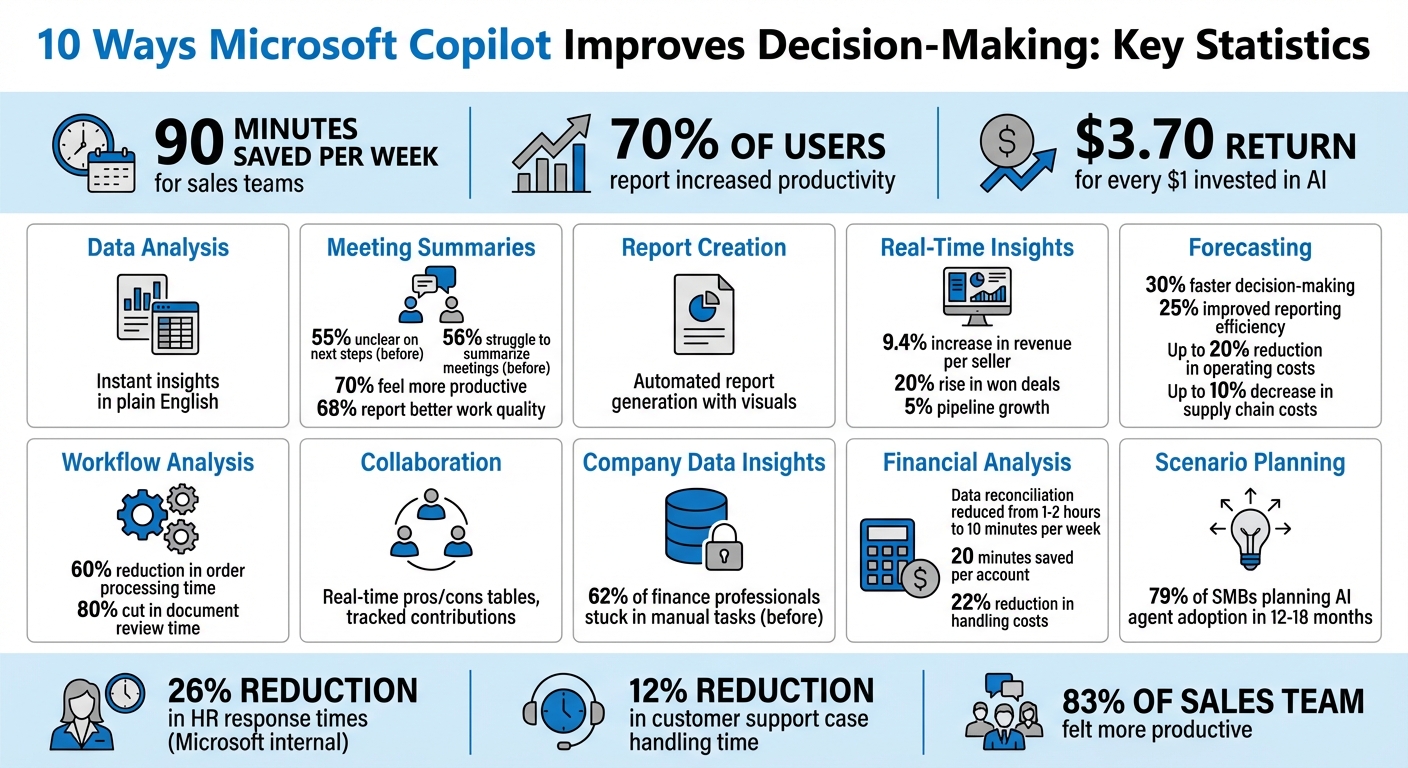
Microsoft Copilot Decision-Making Benefits: Key Statistics and Impact Metrics
7 Microsoft Copilot Use Cases for Business Leadership & Management Roles
How Microsoft Copilot Changes Decision-Making
Microsoft Copilot’s Work IQ taps into your organization’s data – emails, files, meetings, chats – and transforms it into actionable insights. Instead of spending hours digging through files or analyzing data, you can simply ask questions in plain English and get instant answers, all powered by the Microsoft Graph. This seamless access to data not only saves time but also sets the stage for automating both everyday tasks and more complex strategic analyses.
This tool is designed to support both operational and strategic decisions. For example, with routine tasks like expense approvals, AI Approvals in Copilot Studio evaluates requests against predefined business rules, automating decisions and reducing the mental load on your team. While it handles repetitive tasks, Copilot also excels in strategic areas. Its specialized agents, like the Researcher and Analyst, deliver in-depth analyses to assist with forecasting, scenario planning, and identifying trends.
"AI approvals in Copilot Studio will transform how organizations handle decision-making: automating approval workflows while preserving human oversight where it matters most." – Derah Onuorah, Product Manager, Microsoft Copilot Studio [2]
Microsoft’s HR team experienced this transformation firsthand when they revamped their "Ask HR" service in late 2023 using Copilot. The result? A 26% reduction in response times for complex benefits and payroll inquiries. Chief People Officer Kathleen Hogan highlighted how the AI accelerated data gathering from multiple internal sources, enabling HR professionals to make quicker, more informed decisions [10].
This shift to "human-led, agent-operated" workflows is a game-changer. AI takes care of data synthesis and routine processes, allowing you to focus on strategic, high-value work. For instance, Microsoft’s internal sales team reported saving an average of 90 minutes per week, with 83% of the team saying they felt more productive. This extra time allowed them to focus on building stronger customer relationships instead of being bogged down with administrative tasks [10]. These improvements clearly demonstrate how Copilot enhances decision-making efficiency across the board.
1. Speeds Up Data Analysis in Excel and Power BI
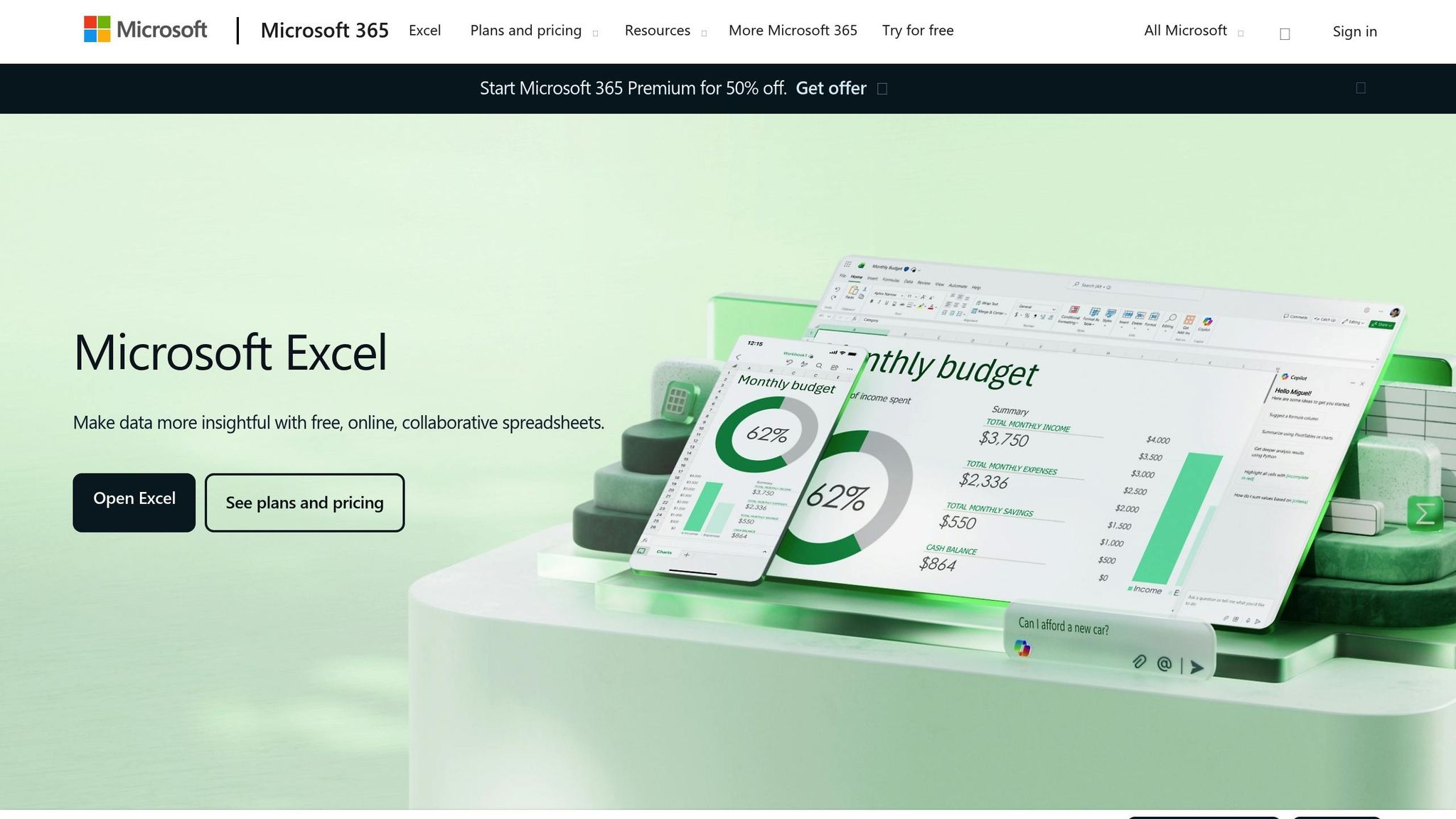
Gone are the days when data analysis meant wrestling with complex formulas and manually digging through spreadsheets for patterns. With Microsoft Copilot, you can now ask questions in plain English – like, "Are there any trends in my data?" – and get instant answers [12][13].
But Copilot doesn’t just answer questions. It actively improves your data quality by spotting and addressing issues like duplicate entries, blank cells, inconsistencies, and errors. Plus, it reveals patterns you might not notice, such as seasonal spikes in marketing data or irregular access patterns in system logs. In Power BI, Copilot goes a step further by generating DAX queries and explaining differences, like why actual spending doesn’t match the budget [6][7]. For example, Microsoft showcased how an analyst used Copilot to create trend visualizations and variance explanations in just minutes – a process that used to take hours [7].
"Copilot analyzes your data to show insights as charts, PivotTables, summaries, trends, or outliers." – Microsoft Support [14]
To get the most accurate results, format your Excel data as a table and use column headers as references [12][14]. If you’re switching between datasets or topics, hitting the "clear chat" button ensures that previous queries don’t interfere with new ones [1]. These simple steps make it even easier to uncover meaningful insights, especially when transitioning to Power BI for deeper analysis.
It’s worth noting that Power BI’s Copilot features require a paid Microsoft Fabric capacity of F2 or higher, and activation might take up to 24 hours [1]. For Excel, AutoSave must be enabled, and your file needs to be stored on OneDrive or SharePoint [8].
2. Summarizes Meetings and Extracts Action Items in Teams
Since February 2020, the number of Teams meetings and calls has tripled [16][18]. Yet, 55% of workers admit they’re often unclear about next steps after a meeting, and 56% struggle to summarize what actually happened [16]. Copilot in Teams addresses these challenges by turning meetings into searchable, structured knowledge objects [18].
With Copilot, you can stay on top of meetings – whether you’re present or not. During or after a session, ask it to catch you up, organize key points, or create AI-driven notes that highlight the main takeaways and assign follow-up tasks [15][20]. For example, you can say, "Create a table with the ideas discussed and their pros and cons," or ask, "What are the next steps for [Project Name]?" Copilot pulls actionable insights straight from the meeting transcript [19][20].
To ensure accuracy, Copilot includes citations for its responses. Clicking on a citation takes you directly to the exact moment in the transcript or chat where that information was mentioned. To make the most of these capabilities, enable live transcription for precise summaries and references [20]. These tools redefine how meetings are transformed into actionable insights.
Maria Cassa Rohrer, Chief of Staff at Sunrise, shared her experience:
"If I’m unable to attend a meeting, I don’t have to ask a colleague what the big takeaways were. I can just ask Copilot for a summary and a few seconds later I have it." [4]
Stephen Dowling, her colleague, added:
"That’s the beauty of Copilot: it eliminates exactly those tedious tasks that take up unnecessary time, while also empowering our employees to do more of the tasks they love." [4]
Need to share or organize information? Copilot lets you export detailed summaries or task lists directly to Word or Excel with just a click [20][21]. Surveys reveal that 70% of Copilot users feel it boosts their productivity, and 68% say it enhances the quality of their work [17]. These features are available with a Microsoft 365 Copilot license or Teams Premium add-on [16].
3. Creates Reports and Visualizations from Raw Data
Copilot transforms raw data into polished reports and visuals in no time. For instance, if you prompt it with something like, "Create a page to analyze production line efficiency and equipment effectiveness," it will automatically generate the report for you [22]. It determines the necessary tables, fields, measures, and chart types, crafting a fully functional report page on its own [22][24].
The tool is designed to choose the most fitting visual formats – whether that’s bar charts, line graphs, or matrices [24]. By selecting "Suggest content for this report," Copilot evaluates your data and proposes a structured outline, complete with specific pages and visuals [22][24]. You can further customize the output by giving conversational commands like "Change this to a pie chart" or "Add a visual for sales by region" [24]. This smooth transition from raw data to detailed visual reports simplifies everything from basic analysis to more advanced decision-making tools.
Another standout feature is its ability to create embedded summaries that break down complex data for quick insights [22][23]. These summaries are especially useful for stakeholders who need the key takeaways without diving into spreadsheets. As of July 2025, Copilot can even display report visuals directly within the chat pane, making it easier to verify and understand its findings [23].
This streamlined process builds on earlier data transformation capabilities. To ensure the best outcomes, it’s important to prepare your data models carefully – use clear column names and set measures so Copilot can interpret your business context effectively [1].
Keep in mind that these features are available with a paid Microsoft Fabric capacity of F2 or higher, or a Power BI Premium capacity of P1 or higher [1]. For the best AI summarization results, keep visuals simple and distinct, aggregate data by week or month instead of daily intervals, and use clear, descriptive field names [25].
4. Delivers Real-Time Insights on Business Trends
Copilot transforms the way businesses access insights by replacing outdated, static reports with real-time data analysis. Instead of waiting for weekly or monthly updates, it provides insights as trends emerge in your data streams. This feature builds on Copilot’s automated reporting capabilities, connecting live data from ERP systems, CRM platforms, and communication tools to identify patterns as they happen. This approach paves the way for faster, more responsive decision-making based on data [3].
The AI agents also monitor live data to proactively alert teams about potential issues before they escalate. For instance, they can keep an eye on inventory levels, equipment sensor outputs, or shifts in customer behavior [3]. A great example of this in action comes from April 2025, when the Microsoft Customers and Partners (MCAPS) team introduced Copilot Analytics to 30,000 sales professionals. By tracking metrics like pipeline hygiene and deal velocity in real time, they saw a 9.4% increase in revenue per seller and a 20% rise in won deals. Over half the sales team used the tool daily, contributing to a 5% overall pipeline growth [26].
"That shift – from static reporting to continuous response – is what makes digital transformation not just possible, but sustainable." – Microsoft Copilot for Business [3]
Copilot’s functionality is rooted in semantic model grounding, which means it understands your business context and the relationships between your data points [1] [5]. You can ask questions in plain language and get immediate insights, eliminating the need for technical expertise [1]. This makes it easier for team members without analytical backgrounds to spot trends that previously required specialists.
To maximize its impact, consider introducing Copilot in data-heavy departments like finance, supply chain, or customer service [3] [10]. For meaningful insights and trend analysis, aim for daily usage by at least 50 to 100 people within a specific function [26].
5. Supports Forecasting and Predictive Analysis
Copilot takes real-time insights a step further by offering robust predictive features. Instead of relying on manual formulas, it can instantly generate multi-year projections. For example, you can simply ask, "Forecast revenue by category for the next two years", and Copilot will deliver detailed projections right away. It also standardizes data formats to ensure your historical data is ready for accurate modeling [27].
With Excel’s built-in Python support, you can create and fine-tune predictive models directly within the platform. Copilot can generate an initial forecast chart, and you can tweak the AI-generated Python code to better align with your specific business needs. This means advanced analysis, once reserved for specialists, is now accessible to a broader range of users [1].
These forecasting tools accelerate decision-making by up to 30% and enhance strategic planning by providing precise cost and supply chain insights. They also improve reporting efficiency by 25% [28]. According to surveys, 59% of businesses have seen operating costs drop by up to 20%, while supply chain costs have decreased by as much as 10% [29]. Beyond financial forecasts, Copilot can detect patterns in customer behavior, predict potential equipment failures by analyzing sensor data, and create strategic scenarios to help teams evaluate different outcomes before committing resources [3][7].
"Data-driven decision-making is the goal for most enterprise organizations… Copilot’s AI can interpret large datasets and present end-users with meaningful insights by spotting patterns and developing forecasts." – Red River [31]
To maximize forecasting accuracy, it’s best to provide specific details in your prompts, like the client’s industry, budget range, or project goals, instead of using generic requests [31]. A practical approach is to test Copilot’s predictive features in one department first, track key performance indicators (KPIs) to measure improvements, and then scale its use across the organization [31].
sbb-itb-7878072
6. Analyzes Workflows for Better Operational Decisions
Copilot dives into structured and unstructured data sources – like ERP systems, CRMs, emails, and chats – to uncover workflow issues and bottlenecks. Unlike traditional rule-based systems, it uses advanced logic to pinpoint where processes slow down and where automation can make the biggest difference.
On top of this analysis, Copilot provides real-time monitoring to tackle inefficiencies as they happen. It keeps an eye on inputs like inventory levels and equipment sensor data, recommending timely actions such as restocking or scheduling maintenance when something seems off. For instance, some businesses have managed to reduce order processing times by 60% and cut document review times by 80% [3].
By automating routine approvals, Copilot not only speeds up decision-making but also minimizes human error. With Copilot Studio, multistage approvals are automated by aligning requests with predefined business rules. To get the most out of this, focus on automating repetitive tasks like meeting summaries or routine communications. When setting up AI approvals, establish clear criteria – for example, "reject expense reports over $500 without manager pre-approval" ensures consistent and reliable outcomes [2]. Tools like Power BI and Azure Monitor can then help you track metrics like time saved and accuracy, giving you the data needed to fine-tune workflows.
The move toward continuous response is a game changer. AI agents now observe, decide, and act in real time rather than relying on static reports. This proactive approach allows businesses to adapt quickly to changing conditions – whether that’s adjusting staffing levels, optimizing delivery routes, or catching quality issues in manufacturing before they escalate [3]. These automated decisions don’t just improve efficiency; they lay the groundwork for even bigger strategic advancements.
7. Improves Collaboration for Team Decision-Making
Copilot turns meetings into dynamic decision-making sessions. Imagine being in a Teams meeting and asking Copilot to create a pros-and-cons table on the spot. This feature lets everyone see the options clearly, side by side, making it easier to weigh choices in real time – no more relying on scattered notes or hazy memories.
It doesn’t stop there. Copilot also keeps track of individual contributions during meetings. It notes who suggested what, who agreed, and who raised concerns. When it’s time to make a decision, you can ask something like, "What idea would you recommend based on today’s discussion?" Copilot then pulls together the pros, cons, and strategies discussed, offering a well-rounded recommendation [19]. This level of organization makes it easier for teams to collaborate on creating actionable plans.
In September 2023, Sunrise, a Swiss telecommunications company, introduced Microsoft 365 Copilot to 300 employees as part of an early access program. Stephen Dowling, Senior Agile Delivery Partner, and Maria Cassa Rohrer, Chief of Staff, led the initiative. The team used Copilot in Teams to summarize meetings and identify key action points. Maria highlighted how Copilot improved asynchronous collaboration:
"If I’m unable to attend a meeting, I don’t have to ask a colleague what the big takeaways were. I can just ask Copilot for a summary and a few seconds later I have it" [4].
This eliminated the need for manual recaps, allowing team members to stay in the loop and contribute to decisions without having to sift through lengthy recordings.
With Copilot Pages, teams can take AI-generated responses and turn them into editable, collaborative documents. These tools simplify the process of creating actionable plans, ensuring everyone stays on the same page from brainstorming to execution [11].
8. Provides Context-Specific Insights from Company Data
Copilot leverages a process called "grounding" to tap into your company’s unique data – this includes file content, semantic model schemas, and metadata. The result? Answers that are tailored to your organization, not just generic responses pulled from a knowledge base [5].
It’s designed to understand the structure of your data across platforms like Power BI and Microsoft Fabric. For example, it knows how Lakehouse tables are set up and how datasets are connected. Instead of writing SQL queries, you can simply ask questions in plain English, such as, "What’s the distribution of the ‘age’ column?" [34]. Copilot pulls this information from multiple sources, including Microsoft 365 files, Dynamics 365 CRM and ERP systems, Azure infrastructure, and OneLake data stores [34][36]. This level of integration also helps track performance metrics more effectively across your organization.
Tools like Viva Insights allow you to upload essential business data – think sales numbers or IT resolution times – while Advanced Reporting provides access to over 100 metrics for a more detailed look at performance [33].
Privacy is a key focus. Copilot only accesses files you’re authorized to view, and your prompts and responses are never used to train the AI models behind the scenes [35]. To get the most out of this tool, it’s a good idea for data teams to prepare semantic models with clear naming conventions and comprehensive field descriptions [5].
9. Simplifies Financial Analysis and Budgeting
Financial teams often find themselves bogged down by repetitive tasks. In fact, 62% of finance professionals admit they’re stuck in the grind of manual data entry and review cycles [39][40]. That’s where Copilot steps in, automating calculations and pulling real-time insights straight from ERP systems like SAP and Microsoft Dynamics 365.
Take Microsoft’s Commercial Revenue Planning team as an example. In February 2024, under the leadership of Sarper Baysal, the team introduced Copilot for Finance to tackle data reconciliation. The results? What used to take 1–2 hours per week now only takes 10 minutes. Baysal summed it up perfectly:
"Financial analysts today spend, on average, one to two hours reconciling data per week. With Copilot for Finance, that is down to 10 minutes." [39]
Copilot doesn’t stop at reconciliation. It also automates variance analysis using natural language prompts in Excel, so analysts no longer need to manually sift through data to find anomalies or mismatched values [40]. In another pilot program focused on accounts receivable, Copilot saved 20 minutes per account and reduced overall handling costs by 22% [39].
When it comes to budgeting, Copilot takes efficiency to the next level. It drafts detailed spreadsheets, flags cost variances, and even summarizes stakeholder meetings [37]. Need advanced financial modeling? Copilot can generate Python scripts and transform raw data into polished, presentation-ready visuals [37][38][40]. This shift allows finance teams to spend less time on routine tasks and more time on strategic planning – a priority for 80% of finance leaders [39][40].
10. Generates Ideas and Scenarios for Planning
Copilot continues to push the boundaries of decision-making by offering fresh ideas and data-driven insights for strategic planning. When teams hit a creative roadblock or struggle with assessing options, Copilot steps in to generate alternative approaches and simulate scenarios grounded in data [7]. This means leaders can evaluate strategic options with greater clarity and confidence.
In Excel, Copilot’s Agent Mode is a game-changer for financial modeling. It allows users to quickly update models, run forecasts, and dive into detailed analyses [41]. For those comparing budget scenarios, Copilot integrates internal data with market trends to create benchmarks that teams can act on [41].
What sets Copilot apart is its ability to adapt seamlessly between handling routine tasks and tackling complex planning challenges [32]. For example, when asked a broad question like, "What are our best options for entering the European market?", Copilot doesn’t just provide surface-level answers. Instead, it crafts a comprehensive plan, gathers relevant data, and verifies its findings [32]. This proactive approach helps organizations spot trends early and gain a strategic edge [38].
Creative bottlenecks are no match for Copilot’s capabilities. Through Microsoft Loop, it organizes cross-functional feedback in real time, ensuring teams stay aligned [30]. Meanwhile, the Researcher agent takes on complex, multi-step projects by pulling structured insights from both internal company files and online sources [9]. Microsoft reports that 79% of small and medium-sized businesses are planning to adopt AI agents within the next 12 to 18 months, recognizing their ability to forecast trends, detect anomalies, and predict demand [11].
The results speak for themselves: less time spent overanalyzing and more time executing informed decisions. Whether it’s planning next quarter’s budget, launching a new product, or fine-tuning supply chain operations, Copilot provides the tools to explore multiple strategies and move forward with confidence.
Conclusion
Microsoft Copilot is transforming decision-making by delivering quick, actionable insights. Instead of spending hours dissecting spreadsheets or combing through meeting notes, teams can now focus on making informed decisions that truly drive results.
The numbers speak for themselves. Copilot excels at both routine tasks and more complex challenges, helping organizations automate thousands of standard operating procedures and simplify intricate workflows. This shift is creating measurable benefits, including significant time savings and cost reductions across key areas like finance, customer service, and HR.
Collaboration also gets a boost with Copilot, as it turns meeting discussions into actionable tasks. From breaking down language barriers with real-time translation to summarizing key action items and connecting data across departments, Copilot keeps teams aligned. Microsoft’s own teams have seen the impact: customer support agents reduced case handling time by 12%, while HR professionals cut initial response times to employee inquiries by 26% [10].
This isn’t just about working faster – it’s about working smarter. By automating repetitive tasks and delivering precise recommendations, Copilot allows teams to focus on strategy and innovation. As Jared Spataro, Corporate Vice President of AI at Work at Microsoft, put it:
"That was when I realized, Wow, this is going to change business in a really significant way" [10].
For organizations aiming to stay competitive, the message is clear: embrace tools like Copilot. Start with high-impact applications, ensure human oversight for critical decisions, and empower your teams to make better choices. The combination of automation, data insights, and smarter workflows creates an environment where decisions are not only faster but more effective – a competitive edge that’s tough to beat.
FAQs
How does Microsoft Copilot make data analysis and reporting easier?
Microsoft Copilot streamlines data analysis and reporting by using natural language prompts to identify insights, build formulas, and produce visualizations directly in Excel. It also assists in drafting and refining Power BI reports and dashboards, making complex data easier to interpret and present. By automating these processes, Copilot not only saves valuable time but also enables businesses to concentrate on making decisions rooted in clear and actionable insights.
How does Microsoft Copilot improve meetings and team collaboration?
Microsoft Copilot in Teams transforms meetings into productive, data-focused discussions. By actively listening to conversations, it captures ideas and organizes them into clear pros-and-cons lists. This eliminates the need for manual note-taking, simplifies decision-making, cuts down on follow-up emails, and ensures everyone’s input is acknowledged in real time.
But Copilot’s usefulness doesn’t stop at meetings. It integrates effortlessly with Microsoft 365 apps like Outlook, Word, and PowerPoint. It pulls together relevant information, drafts content, and generates actionable insights that can be shared instantly with the team. This not only speeds up content creation but also frees employees to concentrate on more strategic, high-value tasks instead of repetitive work.
For those looking to make the most of these AI-powered tools, the "Artificial Intelligence Keynote Speaker" site offers workshops and consulting designed to help businesses achieve tangible outcomes with Copilot.
How does Microsoft Copilot make financial analysis and budgeting easier?
Microsoft Copilot takes the hassle out of financial analysis and budgeting by turning raw data into meaningful insights through natural-language prompts. In tools like Excel, it can handle tasks like reconciling transactions, spotting anomalies, and generating variance-analysis reports – all in a fraction of the time it would take manually. Plus, it delivers easy-to-understand explanations and visualizations, allowing finance teams to shift their focus from data wrangling to strategic planning.
With its AI-powered features, Copilot can tackle tough questions such as “What led to this month’s expense increase?” and even suggest forecasting models or scenario planning options. This means finance professionals can build precise budgets, explore “what-if” scenarios, and provide strategic recommendations faster and more efficiently.
For businesses aiming to get the most out of these capabilities, the Artificial Intelligence Keynote Speaker offers customized workshops and consulting. These sessions are designed to seamlessly integrate Copilot into current workflows, helping organizations turn AI-driven insights into tangible results.